

Your homepage is the digital front door to your business. It is the first impression you make, and you only have an instant to convince visitors to stay. A good homepage design guides users smoothly through your site, builds trust, and encourages them to take action. In this guide, we will explore the core fundamentals of homepage design, layout strategies, and practical user experience (UX) tips so you can craft a high-performing website homepage that fuels sustainable growth.
What Is a Homepage & Why Does It Matter?
The first step in optimizing your digital presence is to understand the true purpose of a website homepage. The homepage sets the tone for user expectations, establishes brand credibility, and directs traffic to key areas of your site. A well-crafted homepage design aligns your business goals with user intent, directly impacting search visibility and overall conversion rates.
A homepage acts as the main hub or navigational starting point of your site. It introduces who you are, what you do, and who you serve.
- Establish brand trust: Visitors judge your credibility within seconds based on visual appeal, proof points, and messaging clarity.
- Direct user journeys: A good homepage acts as a traffic director, pushing users to product pages, service hubs, or contact forms to complete key actions.
- Support search visibility: The homepage is often the most authoritative page on your domain, making it critical for SEO.
Homepage vs. Landing Page: Key Differences
A website’s homepage and landing pages are used very differently to meet user expectations and maximize marketing spend. While the goal of both pages is to engage visitors, confusing their purposes can hurt your conversion goals and frustrate users.
A homepage serves as a broad overview of your entire business. It encourages exploration and offers multiple navigation options. You use it to build brand awareness and serve a wide audience with varied needs.
A landing page, on the other hand, focuses on a single, specific goal. It usually ties into a distinct marketing campaign and strips away navigation to keep the user focused on one call to action (CTA). For example, when running paid search ads, brands typically direct traffic to a landing page rather than a general homepage.
Homepage Design Best Practices That Drive Results
Implementing website design best practices on your homepage is essential for keeping users engaged and turning casual visitors into loyal customers. Great design balances visual appeal with clear usability, ensuring people easily find what they need. By following these homepage best practices, you build trust, reduce bounce rates, and create a clear path to conversion.
When optimizing your homepage design, focus on clarity and user intent:
- Keep the headline clear: Tell visitors exactly what you offer and how it solves their problem right at the top.
- Use a strong call to action (CTA): Tell users exactly what to do next with distinct, action-oriented buttons.
- Optimize for mobile: More than half of web traffic comes from mobile devices. Your design must look and function perfectly on small screens.
- Show social proof: Include testimonials, client logos, or case studies to build immediate trust.
Homepage Layout & UX Essentials
A logical homepage layout combined with smooth user experience (UX) design is the foundation of any successful website. How you structure your information dictates how easily visitors can process your message and take action. A well-crafted layout removes friction, guides the eye naturally to critical content, and keeps potential customers engaged with your brand.
Good homepage layouts rely on visual hierarchy; you must structure content so the most important information stands out immediately.
- Embrace white space: Do not clutter the page. Empty space helps text and buttons stand out.
- Use intuitive navigation: Keep your top menu simple. Users should not have to guess where to click.
- Limit choices: Too many options overwhelm visitors. Highlight your core offerings prominently.
Homepage Layout Examples & Patterns
The best website homepage layouts provide a reliable framework that users understand and feel comfortable navigating. Familiar layout patterns that users already recognize reduce the cognitive load on your visitors, making it easier for them to consume your content. Leveraging these proven homepage layout examples ensures your design supports both usability and high conversion rates.
Popular layout patterns include:
- The F-Pattern: Best for text-heavy sites. Users scan horizontally across the top, then down the left side.
- The Z-Pattern: Ideal for visual sites with less text. The eye moves from top-left to top-right, down to bottom-left, and across to bottom-right.
- Card-based layouts: Excellent for displaying multiple products or services equally, common in ecommerce design.
Homepage Design Examples & Inspiration
Studying examples of successful website homepage designs can provide practical inspiration for your own redesign. Start by analyzing the best homepage design choices in your industry to understand how top brands solve complex UX challenges.
If you need inspiration, you can explore these manufacturing website examples to see how B2B companies present complex information in a clear and actionable way. Alternatively, review these custom ecommerce website design examples to learn how online retailers use visual hierarchy to drive sales. These real-world examples highlight how tailored design directly influences user engagement and business growth.
How to Make a Homepage That Converts
Creating a homepage that actively drives revenue requires marketers to move beyond basic aesthetics and focus instead on building strategic user journeys. The goal is to align every element on the page—from the hero image to the footer—with a specific business objective. Creating a homepage with a conversion-first mindset ensures your website acts as a powerful sales tool rather than just a digital brochure.
To create a homepage that converts:
- Define your primary goal: Do you want lead form submissions, phone calls, or direct purchases? Craft your design to lead users to your desired actions.
- Write compelling copy: Focus on benefits, not just features. Speak directly to the reader's pain points and include easily identifiable calls to action.
- Speed it up: A slow-loading page kills conversions. Compress images and streamline your code to improve load times.
- Test and refine: Use heatmaps and A/B testing to see where users click and where they drop off so you can attack UX friction at the source.
Homepage Design Tools & Platforms
Selecting the right tools for your homepage web design dramatically impacts the quality, scalability, and maintainability of your site. The platform you choose affects everything from page speed to how easily your marketing team can update content. Understanding your options is important to make sure you invest in technology that supports your long-term business goals and complex UX requirements.
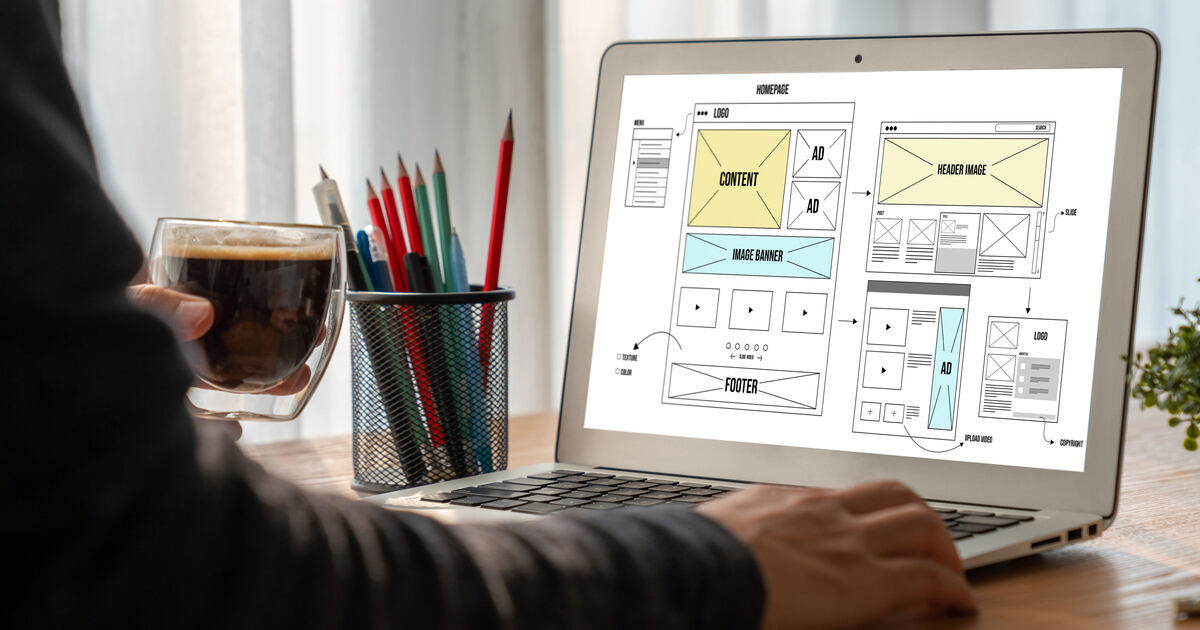
While simple builders like Wix offer quick setups for hobbyists and personal sites, growing businesses need robust content management systems (CMS) and custom frameworks. Platforms like WordPress, Sitecore, or Kentico offer the flexibility required for advanced customization. Professional design teams typically use wireframing tools like Figma or Adobe XD to plan the perfect layout before development begins.
Common Homepage Design Mistakes to Avoid
Recognizing and eliminating common errors in your homepage design can save you from losing valuable traffic and potential revenue. Many businesses unintentionally create friction by focusing too much on internal goals rather than the user's immediate needs.
Avoid these frequent design mistakes to achieve a smoother user experience and a much higher return on your digital investments:
- Vague headlines: Research suggests that if a user cannot tell what you do in three seconds, they are much more likely to leave your site without taking action.
- Too many pop-ups: Interrupting the user immediately upon arrival creates frustration and distracts from natural user pathways.
- Hidden navigation: Creative menus might look cool, but they often confuse users, leading to higher bounce rates and fewer pages visited. Keep navigation predictable to boost engagement.
- Lack of clear hierarchy: Without distinct buttons, contrasting colors, and content blocks of varying sizes, the page can become a confusing wall of information. Create a clear visual hierarchy to break up the page and guide users to key information.
Homepage Design Best Practices for SEO & Performance
A beautiful homepage design won’t do you any good if nobody actually sees it. That’s why it’s important to integrate technical performance and SEO best practices into your website homepage. Search engines reward fast, well-structured, and accessible pages with higher rankings. Balancing visual appeal with strict performance standards helps drive organic traffic and keeps users engaged once they arrive.
Make sure you:
- Use proper heading tags: Structure your page with one clear H1 tag, followed by logical H2 and H3 tags.
- Optimize images: Use modern formats like WebP and include descriptive alt text for accessibility and search engines.
- Ensure fast load times: Minify scripts and utilize caching to improve load times. A fast homepage improves both the user experience and search rankings.
Get Expert Help with Homepage Design & UX Strategy
Partnering with an experienced agency can help align your website homepage design with modern standards to advance your business goals. Trying to build the best homepage design entirely in-house often drains internal resources and leads to suboptimal results. Expert guidance ensures your site benefits from data-driven UX strategies, professional visual aesthetics, and flawless technical execution.
At Americaneagle.com, we specialize in comprehensive experience design that drives results. Our team understands how to blend strategy, visual design, and technical performance to create homepages that captivate users and grow your business. Contact us today to discuss how we can improve your digital presence.
Frequently Asked Questions About Homepage Design
What is a homepage, and what is its primary purpose?
A homepage is the main introductory page of a website. Its primary purpose is to welcome visitors, explain what the business offers, and guide users to relevant sections of the site.
What should be on a website homepage?
A homepage should feature a clear value proposition, intuitive navigation, and strong calls to action. It should also include trust signals like testimonials, an overview of services, and easily accessible contact information.
What makes a good homepage design?
A good homepage combines clean visual aesthetics with intuitive usability. It uses a clear visual hierarchy, loads quickly, and immediately addresses the user's needs and pain points.
What is the best homepage layout for usability?
The best layout organizes information logically, often using an F-pattern or Z-pattern for natural reading. It uses plenty of white space and prominent buttons to make navigation effortless.
How does homepage design impact user experience (UX)?
Homepage design dictates how easily a user interacts with your brand. A well-designed homepage reduces friction, prevents frustration, and helps users find information rapidly.
How does homepage design affect SEO and search rankings?
Search engines look at your homepage's structure, load speed, and mobile-friendliness. Proper keyword usage in headings and reliable site performance significantly boost your overall domain authority and rankings.
What is the difference between a homepage and a landing page?
A homepage provides a broad overview of a business with multiple navigation paths. A landing page is built for a specific marketing campaign and focuses on driving a single, specific action.
How often should you update or redesign your homepage?
You should refresh your homepage content regularly to keep it current. A full redesign is typically recommended every two to three years to keep up with evolving web standards and user expectations.
What are common homepage design mistakes to avoid?
Avoid cluttered layouts, slow-loading images, and confusing navigation menus. You should also avoid vague headlines that fail to clearly explain what your business actually does.
What are homepage design best practices for mobile users?
Ensure your text is readable without zooming and buttons are large enough to tap easily. Prioritize fast load times and use a responsive design that adapts seamlessly to any screen size.
How many calls to action should a homepage have?
Your homepage should have one primary call to action that stands out visually. You can include secondary CTAs for different user journeys, but they should not compete with your main goal.
What content should appear above the fold on a homepage?
The area above the fold must include your logo, main navigation, a compelling headline, and a clear primary call to action. Users should understand your value before they ever start scrolling.
Are homepage templates effective, or is custom design better?
Templates work for basic sites on a tight budget. However, custom design is far better for growing businesses because it perfectly aligns with your specific brand, UX needs, and scalability goals.
How do homepage design needs differ for small businesses vs. enterprises?
Small businesses usually focus on establishing local trust and driving direct contact. Enterprises require complex navigation, robust architectures, and designs that serve multiple distinct audience segments simultaneously.
What metrics should you track to measure homepage performance?
Track your bounce rate, average time on page, and conversion rate. Monitoring click-through rates on your primary calls to action will also help you measure user engagement effectively.