


If your website is built on Sitecore, the platform already secures content delivery to be read-only, publicly published content, gated by a secret key. But there is still room to go further. A clever individual can use GraphQL to freely peruse any and all content available on your site. For some businesses, this can be a concern. This post explores three ways to tighten GraphQL access beyond the standard Sitecore platform security.
The code needed to implement these solutions is available in this sample GitHub repository. The solutions provided are based on Sitecore Content SDK 2.0.1, Next.js 16 (compatible with Pages or App Router). Because this approach implements general solutions, it can be adapted to other versions or frameworks, including non-SitecoreAI setups.

Issue #1 – Exposed API Secret
Sitecore’s GraphQL endpoints take either an Edge Context ID or an API Key. If you need your headless app to query content client-side, the simple option is to set a NEXT_PUBLIC environment variable so the browser can request data directly. But a bad actor can snatch that value, craft any query they’d like, and pull content out of the (publicly published read-only) data endpoint.
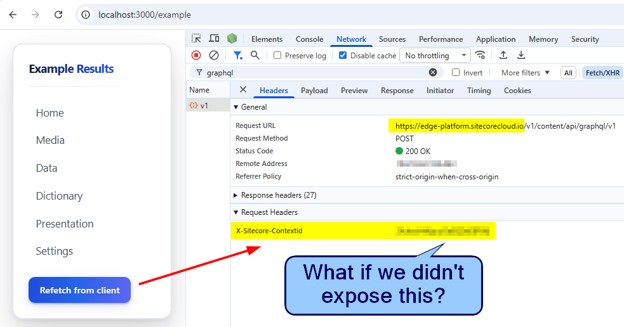
Solution #1 – Proxy the Request to Hide the Header
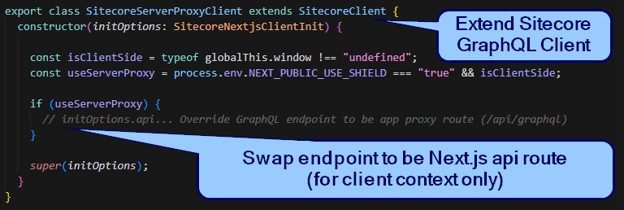
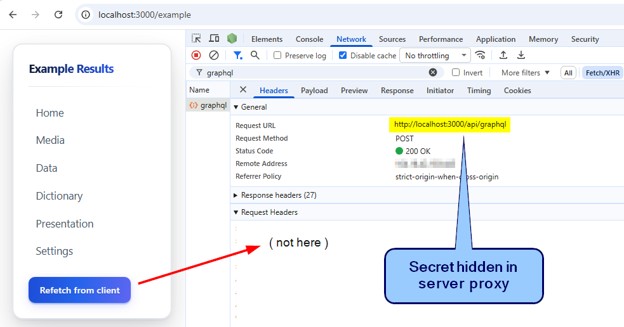
A simple solution is to run the query server-side, so the secret is never exposed to web browsers. A full stack framework like Next.js makes this easy. A smooth approach is to leverage Sitecore’s Content SDK query client, making it context aware. If the request is coming from the web browser (CSR), send queries to the new proxy route. If the context is server (SSR, ISR, SSG, edge), fall back to standard behavior, sending directly to Sitecore endpoint with secret available.
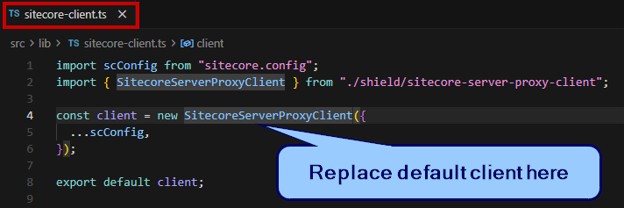
Override Sitecore Client:
Implement Proxy Route:
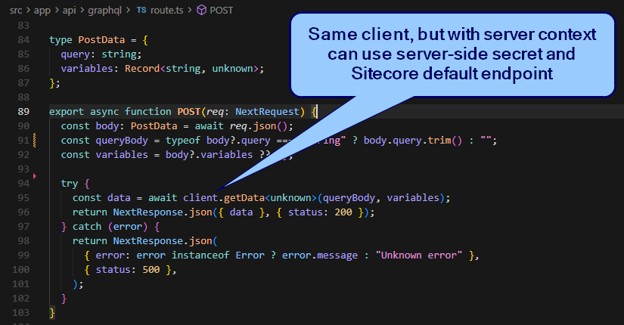
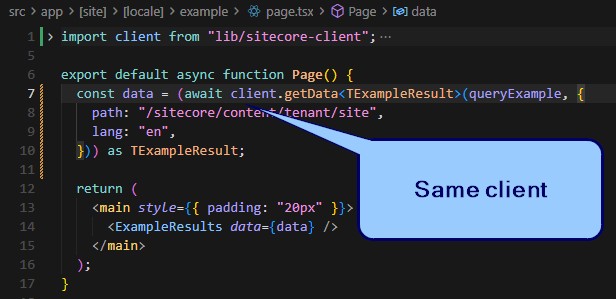
This trick lets you reuse the same fetch code everywhere without worrying about context.
Approach summary:
- Ensure Edge Context ID is not provided to a NEXT_PUBLIC environment variable
- Remove NEXT_PUBLIC_SITECORE_EDGE_CONTEXT_ID
- Extend Sitecore Query Client to be context aware (client vs. server vs. edge)
- Send web client requests to proxy route
- Implement proxy route to forward request using default Sitecore client
Example #1
In code, call client.getData anywhere:
When invoked from the browser (on click handler – see in GitHub repo), it will use the proxy:
Further Thoughts on the Topic:
Gated Deployments – Vercel supports gated deployments, which can block browser requests to this new proxy. Fortunately, this is already solved with the context aware Sitecore Client, conditionally appending the Vercel bypass secret as needed.
Route Name Choice – In this version of Content SDK, there doesn’t seem to be a way to change the URL path when using the edge context ID option, only the domain is configurable. So, the solution is to match the path “/api/graphql”, just clearing the domain so it acts as a relative URL client side. This behavior may change unexpectedly between versions.
Cost – Adding a proxy does add cost and latency. This GitHub sample uses a Next.js API route which incurs some cost and possible warm-up delays. The implementation could be moved to Next.js proxy (formerly named middleware) to be more efficient. Note, however, that serverless functions can be configured to have static IPs, where proxy middleware cannot. This is a key consideration for non-SitecoreAI projects with an interest in gating incoming GraphQL requests by IP.
Caching – The GitHub example provided does not have caching configured for the proxy. But this can be an area to consider to reduce costs.
Next.js Server Actions – Because Sitecore supports App Router, the proxy could be replaced with a server action call.
Issue #2 – Whoops, We Made it Worse!
Happy that the ID is now secret, we shudder to realize it’s even worse! The secret is now irrelevant. Access is more exposed. Anyone clever enough can now freely query any crafted request against the proxy, no secret needed.
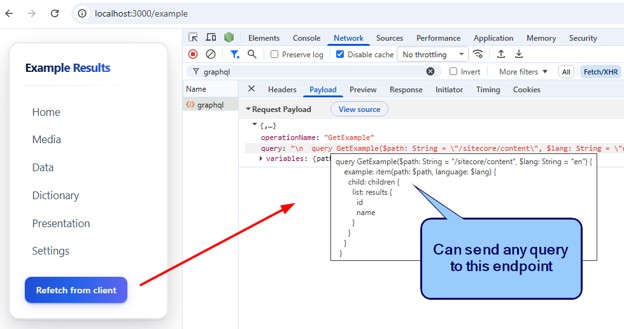
Solution #2 – Known Queries Only…& Encrypted Too!
The idea is simple. The codebase contains all defined queries. Use them to block anything else. This is great! It would completely lock down the free-form nature of GraphQL. Soft clay for developers, but baked solid when deployed. The implementation needs a bit of magic. So, let’s throw in a bonus. We can obfuscate the query body. We’ll hash the full query body (giving a much smaller payload which helps throughput, too). The client request will only send the hash, so even the query schema is hidden.
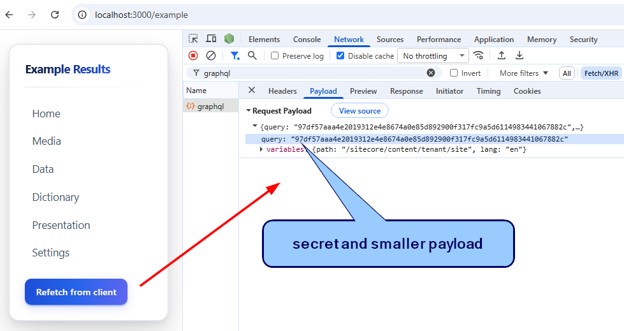
Now, if you try to mess with the query, it’s blocked:
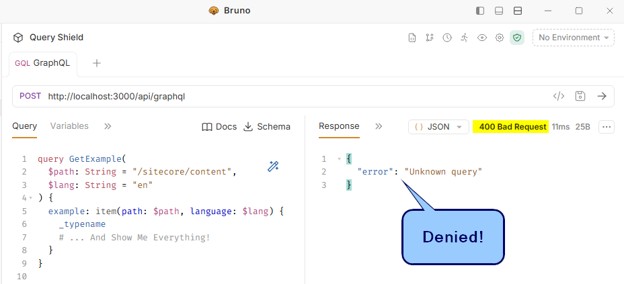
Here are the key points of this approach:
- Assume that all GraphQL queries live in separate *graphql.ts files
- During build, generate hashes and a lookup list of GraphQL queries
- With Content SDK, this can be done with a buildCommand in sitecore.cli.config
- Generate *graphql.shield.ts file aside each graphql.ts file
- Normalize query body (to condense payload and avoid silly whitespace differences)
- Hash query body
- Save hashed value to *graphql.shield.ts
- Add hash and query body as key-value pairs to lookup file
- During build, for client bundle only, use hash in place of query body
- Use turbopack loader (Next.js 16) or webpack aliases (for earlier versions)
- Import *graphql.shield.ts in place of *graphql.ts
- Now all client-side queries will use the hash
- Use turbopack loader (Next.js 16) or webpack aliases (for earlier versions)
- Gate query requests
- Extend query proxy (from Solution #1 above)
- Only client-side requests need to be gated
- Context aware Sitecore client helps again as server-side context can bypass this feature
- Only client-side requests need to be gated
- Check if requested hash or query body is in known list
- If not, block it
- Extend query proxy (from Solution #1 above)
Further Thoughts on the Topic
Lookup Size – It is worth considering the file size of the GraphQL query lookup file. The provided GitHub example runs as a serverless function where there are memory allocation costs. As a reference for a real-world project with a high number of client-side queries, this lookup file was 25 MB. We opted to include it with the serverless function as it easily fit within the reserved space. If proxy is moved to run on Next.js edge, then there are tighter file size limitations to consider and additional processing for every request.
Remote Lookup – Instead of including the lookup list in code, it could live in a remote cache. For example, on build, send the records to Vercel Edge Config. Fetch the query from Vercel Edge Config by hash as key. Or, if given the query body, normalize then hash it to do the lookup. This would remove the bloat of the lookup list from the deployment bundle.
Issue #3 – Path Variable
Even with the query bodies frozen, the variables can still be manipulated. There is likely a query with a “path” or “ID” input returning generic child items that could be used to traverse the content tree. While this is a much limited and smaller concern, it can still trigger discomfort. In fact, for multi-tenant setups, queries can be used to hunt around other sites’ data in the CMS—even other MVC sites that are not part of new headless migration scenarios.
Solution #3 – Block Out-of-Scope Variable Values
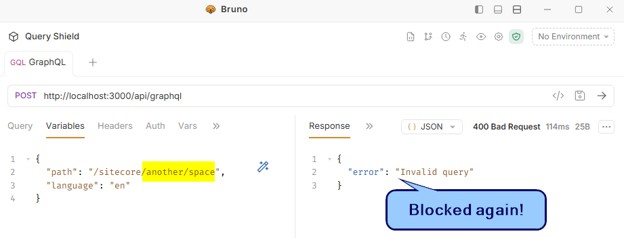
Leaning on the query proxy again (refer to: src\app\api\graphql\route.ts), some simple checks can be added:
- Sniff for any “path” or “ID” variables
- Force paths to starting with “/sitecore” to be fully scoped to expected site paths
- Block general platform IDs such as “/sitecore” and “/sitecore/content” items
Keeping Your Sitecore Environment Secure & Resilient
Sitecore is continuously scanning for the latest vulnerabilities and strengthening its defenses, helping ensure your website stays protected as threats evolve. To improve your security posture even further, you can extend these protections with best-practice configurations and governance tailored to your environment. By taking a proactive approach, your team can confidently safeguard sensitive data and maintain a secure, high-performing digital experience for your users.